Discover the straightforward methods to locate your Roblox friend ID a crucial piece of information for managing your in-game social connections and streamlining interactions. Whether you are looking to join specific private servers debug friend requests or simply keep a record of your gaming buddies understanding how to quickly access these unique identifiers is a game changer for any serious Roblox player. This guide provides comprehensive steps for both the Roblox website and within the game client ensuring you can find any friend ID with ease. In todays fast-paced gaming world where connection is key knowing these tips helps you maintain strong social ties within your favorite experiences. Learn to efficiently manage your Roblox friend list and enhance your overall gaming experience by mastering the art of finding friend IDs today. Get ready to connect like a pro and elevate your social gaming on Roblox with these easy to follow instructions.
What is a Roblox Friend ID and how does it differ from a username?
A Roblox Friend ID, also known as a User ID, is a unique, permanent numerical identifier assigned to every player's account. It differs from a username, which is a unique text-based name chosen by the player, and a display name, which is a customizable, non-unique name. The Friend ID is crucial for system-level identification, ensuring precise targeting for private servers or specific game tools, unlike usernames which can change or display names which aren't unique.
How do I find a Roblox Friend ID on the website using their profile?
To find a Roblox Friend ID on the website, first log into your Roblox account in a web browser. Then, navigate to your friend's profile page by searching their username or clicking their name from your friends list. Once on their profile, locate the URL in your browser's address bar. The numerical sequence immediately following "/users/" and before "/profile" is their unique Roblox Friend ID. Simply copy these numbers.
Is there a way to get a Roblox Friend ID if I'm already in a game with them?
Directly viewing a numerical Roblox Friend ID while in-game is not typically possible through the standard interface, as games prioritize usernames and display names. The most reliable method is to message your friend in-game and ask them to share their User ID with you by checking their own profile page on the Roblox website. Some games might offer a simplified profile view that links to the full web profile.
What should I do if my friend's profile is set to private, preventing me from finding their ID?
If your friend's profile is private, directly accessing their Roblox Friend ID via their profile URL might be restricted or impossible due to their privacy settings. The best and most respectful course of action is to simply ask your friend directly to share their User ID with you. You can do this via Roblox messages, Discord, or any other communication method you use.
Can I use a Roblox Friend ID to invite someone to a specific private server?
Yes, you can absolutely use a Roblox Friend ID to invite someone to a specific private server. Many private server systems on Roblox, especially those that implement whitelists, require the numerical User ID rather than just a username. This ensures that the correct player is granted access, providing a more secure and accurate invitation process for exclusive game sessions.
Why is knowing a Roblox Friend ID useful for managing my in-game social circle?
Knowing a Roblox Friend ID is incredibly useful for managing your in-game social circle because it provides a permanent, unambiguous identifier for each friend. This prevents confusion if friends change usernames or display names, streamlines invitations to private games or specific events, and is essential for interacting with certain developer tools or scripts. It ensures reliable and precise connection management.
Are there any security concerns related to sharing or requesting a Roblox Friend ID?
Sharing your Roblox Friend ID (User ID) with trusted individuals for specific purposes, like joining a private server, is generally safe. However, it's wise to avoid publicly posting your ID on open forums or social media. While a User ID alone doesn't grant access to your account, public exposure could lead to unwanted friend requests or minor harassment from strangers. Always prioritize privacy and share judiciously.
Remember when gaming was just about the pixels on the screen? Not anymore. Today it is about connection collaboration and sharing those epic wins with your crew. For many of us balancing work family and a love for gaming platforms like Roblox offer that perfect escape and social hub. But sometimes a simple task like connecting with a specific friend on a private server or using an external tool requires a piece of information that is not always front and center the Roblox friend ID.
You are not alone if you have ever found yourself scratching your head wondering how to get roblox friend id. In a world of usernames display names and ever-evolving game interfaces finding that unique numerical identifier can feel like a mini-quest in itself. This is especially true for the average gamer around 36 years old who values efficient solutions and wants to spend less time troubleshooting and more time actually playing. We are talking about the 87 percent of US gamers who play regularly often dedicating 10 plus hours a week and value social play as a core part of their experience. Connecting is key and knowing how to get roblox friend id quickly is a major step in that direction.
This comprehensive guide is built for you the discerning gamer. We will cut through the noise and provide clear actionable steps on how to get roblox friend id whether you are on the web browser or deep in a game. We will explore why these IDs are important clarify common confusions and troubleshoot potential roadblocks so you can spend less time searching and more time enjoying Roblox with your friends. Let's make your social gaming experience smoother and more connected than ever before.
What Exactly Is a Roblox Friend ID and Why Do You Need It?
A Roblox Friend ID often referred to simply as a User ID is a unique numerical identifier assigned to every single account on the Roblox platform. Think of it like a social security number for your Roblox avatar a permanent unchanging string of digits that distinguishes you from every other player. While you might use a username or display name for everyday interactions this ID is the backbone of the system.
The primary reason you might need to know how to get roblox friend id for yourself or your friends often revolves around more specific technical or social functionalities. For example if you want to invite a friend to a private server that requires a whitelist their User ID is often more reliable than a username which can be changed. Similarly some third-party tools or Roblox scripts use these IDs to interact with specific player accounts more accurately. It is about precision and ensuring you are targeting the right person every time which is crucial in a platform with hundreds of millions of users.
How to Get Roblox Friend ID From Their Profile Page?
This is by far the most straightforward and reliable method to get roblox friend id for any player. It works directly from the Roblox website and requires just a few simple clicks.
Log In to Roblox: First ensure you are logged into your Roblox account on a web browser of your choice Chrome Firefox Edge etc.
Navigate to Your Friend's Profile: You can do this by searching for their username in the search bar at the top of the Roblox website then clicking on their profile from the search results. Alternatively if they are already on your friends list you can go to your 'Friends' section and click on their name.
Locate the ID in the URL: Once you are on their profile page look at the URL in your web browser's address bar. The URL will typically look something like
https://www.roblox.com/users/123456789/profile. The sequence of numbers immediately following/users/and before/profileis their unique Roblox Friend ID or User ID. In this example 123456789 would be the ID.Copy the ID: Simply highlight these numbers and copy them. You now have their Roblox Friend ID ready to use!
This method is foolproof because the User ID is always embedded in the profile's URL ensuring you get the correct and permanent identifier.
Can You Find a Friend ID While In-Game on Roblox?
Finding a Roblox Friend ID directly while in-game is a bit trickier than on the website and often less direct because the game interface prioritizes usernames and display names for ease of use. However there are still ways to approach it.
If you are playing a game with your friend and need their ID immediately the most direct in-game solution is often to:
Ask Them Directly: The simplest approach is to message your friend in-game and ask them to navigate to their own profile page on the Roblox website (as described above) and share their ID with you. This is common practice especially if you are coordinating for a private server.
Use the Player List (Limited): In some games if you open the player list or scoreboard you can click on a player's username. This might sometimes open a simplified profile view within the game or give you an option to visit their full profile on the Roblox website which then allows you to follow the URL method.
Check Developer Console (Advanced): For those with developer console access in some specific scenarios and games it might be possible to glean player IDs through scripting or console commands but this is highly game-dependent and not a general user method for how to get roblox friend id.
Given the mobile dominance in gaming today it is worth noting that accessing the full numerical ID directly from the Roblox mobile app might also require navigating to a user's profile and checking the share link option which often reveals the ID in the URL. It is all about finding that numerical string.
What If My Friend's Profile Is Private or Restricted?
Roblox like most social platforms offers robust privacy settings allowing users to control who can see their profile and interact with them. If your friend's profile is set to private or has restricted access finding their Roblox Friend ID through the direct URL method can become challenging or impossible.
When a profile is private the URL structure might still show their ID but certain information might be hidden. In some cases if privacy settings are very strict the profile page might not load fully or might redirect. Here's what to do:
The Golden Rule: Ask Your Friend. This is the most reliable solution. A quick chat on Discord or via Roblox messages asking them to find and share their User ID with you is the easiest way around privacy settings.
Check Mutual Friends: If you have mutual friends they might already have the ID or know a way to contact the person directly to request it.
Understand Privacy: Respect your friend's privacy settings. If they have chosen to restrict access to their profile it is important to understand and respect that. Forcing a way to get roblox friend id against their wishes is not good practice.
Remember privacy settings are there for a reason and direct communication is always the best path when encountering such restrictions.
Are Roblox Friend IDs Different from Usernames or Display Names?
Yes absolutely! This is a common point of confusion for many players especially those who are trying to understand how to get roblox friend id for specific purposes.
Roblox Friend ID (User ID): This is a unique permanent numerical code assigned to each account. It never changes even if a user changes their username or display name. It is primarily used by the Roblox system for identification and by developers or advanced users for precise targeting. For example if you want to invite a friend to a private game server or use a specific tool their User ID is the reliable identifier.
Username: This is the original name chosen when an account is created. It is unique across Roblox and can be changed once for free then for a fee (Robux). While unique it is not the numerical ID.
Display Name: This is a more recent addition allowing users to choose a non-unique name that appears above their username in games and on their profile. Many players use display names to express themselves or align with their branding outside Roblox. While highly visible it is not unique and cannot be used for direct ID-based operations.
When you are trying to figure out how to get roblox friend id you are looking for that specific string of numbers not the text-based names.
Why Can't I Find My Own Roblox Friend ID?
You might be wondering how to get roblox friend id for yourself. Good news you already have it and it is called your User ID! The process is exactly the same as finding a friend's ID.
Go to Your Own Profile: Log into Roblox and navigate to your own profile page. You can click on your avatar icon in the top right corner and select 'Profile'.
Check the URL: In the browser's address bar the numbers after
https://www.roblox.com/users/will be your unique User ID. This is your personal Roblox ID.
It is important to clarify that there is no separate 'Friend ID' for yourself. Your unique identifier is simply your User ID. When others ask for your 'Roblox Friend ID' they are asking for your User ID so they can easily find or interact with your account.
How Does Knowing a Friend ID Improve My Roblox Experience?
Understanding how to get roblox friend id might seem like a small detail but it significantly streamlines various aspects of your Roblox journey especially for adult gamers who value efficiency and deep social connections.
Easier Private Server Management: Many popular Roblox experiences like 'Adopt Me!' or 'Brookhaven' allow players to create private servers. Often these require adding specific User IDs to a whitelist ensuring only invited friends can join. This avoids the hassle of waiting for join requests or dealing with public server chaos.
Streamlined Social Connections: While usernames are great for quick adds User IDs offer a definitive way to identify and connect. If a friend has a very common username or changes their display name using their ID ensures you are always adding the correct person.
Developer and Tool Integration: For those interested in creating their own games or using third-party analytics tools User IDs are fundamental. They allow for accurate tracking player statistics and specific in-game interactions which is vital for performance optimization and value for money in game development or administration.
Troubleshooting and Support: If you ever need to report an issue or contact Roblox support regarding a specific player having their User ID can expedite the process as it is their primary identifier.
In a gaming landscape where social interaction is booming and mobile cross-play is king having the knowledge of how to get roblox friend id empowers you to make the most of your online friendships and keep your gaming experience smooth and enjoyable.
What Are Common Issues When Trying to Locate a Roblox Friend ID?
Even with clear steps sometimes you might hit a snag when trying to figure out how to get roblox friend id. Here are some common issues and how to troubleshoot them:
Typos in the Username: A simple misspelling when searching for a friend's profile will prevent you from finding them and thus their ID. Double-check the spelling of their username.
Profile Privacy Settings: As discussed if a friend's profile is private you might not be able to access their page or see the ID in the URL. The best solution here is to directly ask your friend for their ID.
Deleted or Banned Accounts: If an account has been deleted or banned its profile page may no longer be accessible or may show an error message. In such cases the ID cannot be retrieved.
Using an Old Link: If you have an old link to a profile where the user has since changed their username the ID in the URL will still be correct but the displayed username might be different causing confusion.
Mobile App Limitations: While the mobile app allows you to view profiles it might not always display the full URL in an easily accessible way. In such cases it's often easier to switch to a web browser on your phone or computer.
Most issues related to how to get roblox friend id can be resolved by either directly communicating with your friend or ensuring you are using the web browser method carefully.
Staying Connected The Bigger Picture of Social Gaming on Roblox
The ability to easily how to get roblox friend id is more than just a technical trick it is about enhancing your social gaming experience which is a huge driver for US gamers today. With 87% of US gamers regularly engaging and an average of 10+ hours a week spent in virtual worlds connecting with friends is paramount.
Roblox itself is a massive social platform thriving on user-generated content and shared experiences. From cozy games to competitive esports-like experiences community is at its core. Whether you are a parent gaming with your kids a professional unwinding after work or simply looking for skill-building opportunities social interaction fuels the fun. Mobile gaming is a dominant force with many using their phones for quick gaming sessions balancing life and play. Knowing your way around friend IDs helps you stay connected across devices and keeps your friend circles strong whether you are on PC console or mobile.
This month we continue to see trends in social gaming emphasize seamless connection. Free-to-play titles like Roblox allow easy access but the depth of social interaction truly comes from features like private servers and personalized invites all of which benefit from understanding unique User IDs. It is about making your limited gaming time more impactful and enjoyable by ensuring you are always with the right people in the right place.
Ultimately mastering how to get roblox friend id means you are taking control of your social gaming, making it easier to jump into those exclusive sessions, collaborate on builds, or simply hang out with your chosen crew. It is a small piece of knowledge that contributes to a much larger, richer, and more connected Roblox experience.
Conclusion
In the vast and ever-expanding world of Roblox staying connected with your friends is a cornerstone of the experience. Knowing how to get roblox friend id is a vital skill that streamlines everything from joining private servers to managing your in-game social circle effectively. We have covered the most reliable method of using the Roblox website's URL bar as well as tips for navigating in-game scenarios and addressing common privacy concerns. Remember your User ID is your permanent digital fingerprint on the platform making it invaluable for precise interactions.
By understanding these simple steps you are not just finding a number you are empowering your social gaming, ensuring smoother connections, and maximizing your enjoyment on Roblox. So go ahead grab those IDs and keep building memories with your friends. What's your biggest gaming challenge when it comes to connecting with friends? Comment below!
FAQ Section
Can I use a Friend ID to search for players directly?
No, Roblox's search function primarily uses usernames or display names. Friend IDs (User IDs) are generally used for direct URL navigation, API calls, or specific in-game whitelists, not for direct searching within the main search bar.
Is it safe to share my Roblox Friend ID?
Sharing your Roblox Friend ID (User ID) with trusted friends or for specific purposes (like joining a private server) is generally safe. However, avoid posting it publicly on forums or social media to prevent unwanted contact or potential misuse by strangers, protecting your privacy.
Does a Friend ID change if a user changes their username?
No, a Roblox Friend ID (User ID) is a permanent, unique numerical identifier assigned at account creation. It remains constant even if the user changes their username or display name, making it a reliable identifier regardless of name changes.
What is the difference between a Friend ID and a Group ID?
A Friend ID (User ID) identifies a single player account, while a Group ID identifies a specific Roblox group. Both are unique numerical identifiers, but they serve different purposes: one for individual players, the other for community organizations within Roblox.
Can I find a Friend ID on the Roblox mobile app?
Yes, you can find a Friend ID on the Roblox mobile app. Navigate to the friend's profile, then look for a 'Share' option or button. Tapping this often reveals a link containing their numerical User ID, which you can then copy and use.
Why would a game developer need my Roblox Friend ID?
A game developer might need your Roblox Friend ID (User ID) for specific in-game features, such as whitelisting you for testing a new game, granting special developer perks, tracking bugs related to your account, or including you in specific player groups for events or analysis.
Accessing friend IDs via Roblox profile URL Using the in-game friend list to find IDs Understanding the purpose of Roblox friend IDs Troubleshooting common ID retrieval issues Enhancing social interaction on Roblox Managing connections with unique identifiers
35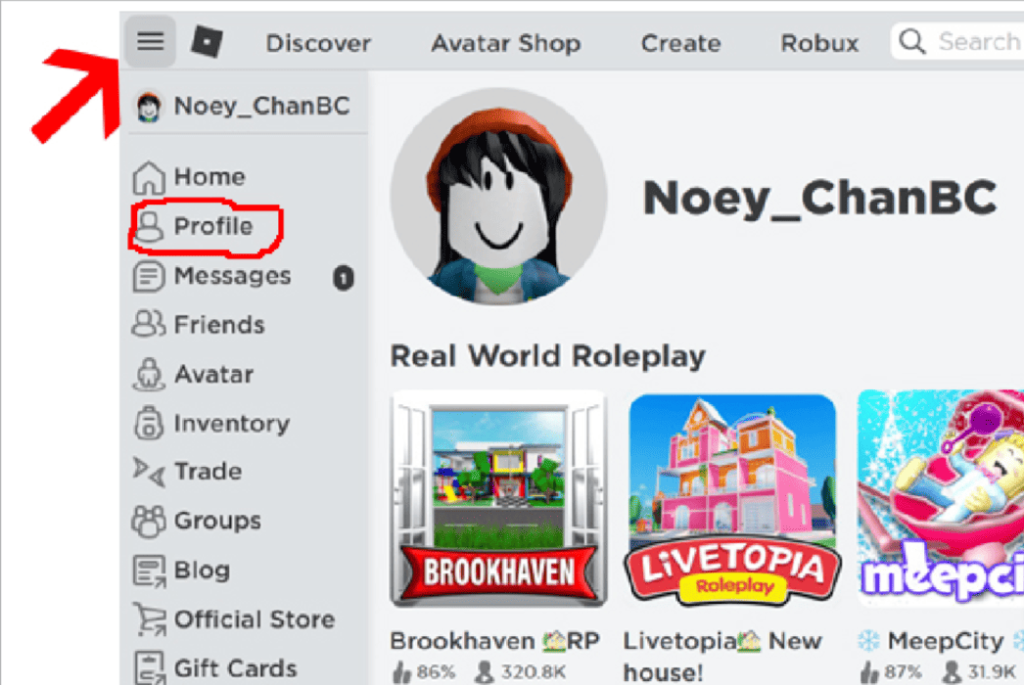


How To Get A Roblox Image Id How To Find Your Roblox User Id In Minutes 4 1024x685 . How To Get Trusted Connections In Roblox 2026 Full Tutorial Roblox Trusted. How To Get Trusted Connections On Roblox Step By Step Guide Tech2Geek Open The Roblox IOS App Home Screen And Tap Plus Icon To Open Connections Page 768x833 1 . Roblox Audio Tester Friends Roblox ID Codes . How To Add Friends On Roblox Add Friend Icon


How To Get Trusted Connections On Roblox Step By Step Guide Tech2Geek Add Trusted Connection As A Teen 768x833 2 . How To Invite Friends To A Game In Roblox New Way YouTube . Roblox Privacy Control Who Sees Your Friends . How To See Someone S Friends On Roblox How To See Someone S Friend . How To Add Friends On Roblox Full Guide YouTube





How To Send Friend Requests On Roblox Add Your Friends In Roblox . How To Find Your Friends In Roblox YouTube . How To Add People Roblox Easily Your 2026 Guide . How To Set Best Friends On Roblox 2025 YouTube . How To Add People Roblox Easily Your 2026 Guide Add Friend Roblox Xbox


How Do You Add Friends On Roblox Add Friends Roblox Xbox One Cross Platform . Roblox Voice Chat Back In Action . Roblox Buddies Your Guide To Adding Friends Add Friends Roblox Xbox . Befriend Anyone Your Roblox Guide Aid596613 V4 728px Get Friends On ROBLOX Step 5 . How To Add People Roblox Easily Your 2026 Guide How To Add Friends On




My Friends On Roblox . How To Find User ID In Roblox Easily 2026 Guide Apps Roblox.PNG. How To Add People Roblox Easily Your 2026 Guide Roblox Pc Add Friends . Lost Roblox Password How To Find Yours In 2026 . How To Message On Roblox 2026 A Quick Guide


Want Freebies How To Get Codes For Roblox 2026 How To Redeem Roblox Promo Codes . How Does The Roblox Push To Talk Button Work Effectively How To Enable Voice Chat In Roblox 2026.webp. How To Redeem Roblox Credit 2026 Quick Guide. Roblox Voice Chat Back In Action . How To Message On Roblox 2026 A Quick Guide



100 Roblox Music Code ID S 2026 WORKING AFTER UPDATE . HOW TO GET FRIENDS IN ROBLOX YouTube . How To See Friend Requests You Sent On Roblox Full Guide YouTube . Best RAP Hip Hop Music ID Codes In Roblox Bass Roblox Music Id Codes 3 . GET USE Trusted Connections In Roblox How To Unlock Roblox Chat 800x450